
How to charge your clients automatically as a software reseller

To charge clients automatically as a reseller, record each client's amount and due date, let the system create the charge a few days before and send the payment link by email and WhatsApp, mark it as paid on its own when the client pays and remind whoever is late. The point almost everyone forgets: your clients' due dates need to fall before the day you pay your provider.
In this guide you'll see why manual billing holds resellers back, how to set up the month's calendar, how to collect depending on your country, the step-by-step of automatic billing, what to do with late payers and how to track your portfolio's profit.
Why manual billing holds resellers back
With 3 clients, billing by hand seems easy. With 10 or 20, it becomes a second job: remembering who's due on which day, sending the payment details, checking your bank statement, asking again whoever hasn't paid. And there's a cost that doesn't show up in the spreadsheet: the discomfort of chasing payment from someone you have a partnership with.
- Forgetting: a client nobody remembered to charge becomes a lost month.
- Mismatched cash flow: your provider charges you on a fixed date, even if your clients haven't paid yet.
- Worn-out relationships: you stop being the consultant and become the debt collector.
- No big picture: it's hard to know how much came in, how much is missing and what the month's real profit is.
Automatic billing solves all four. The system does the remembering, sending, checking and notifying; you only step in when a conversation is needed.
The month's calendar: get paid before you pay
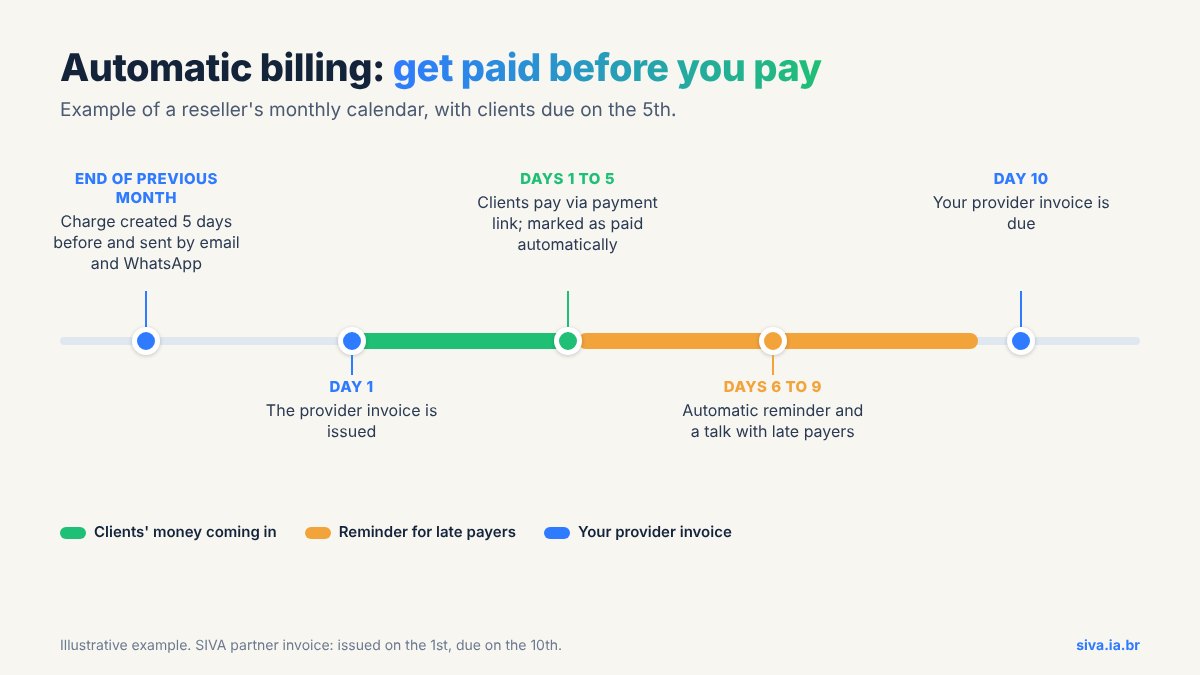
Start with the date you don't control: your provider's. In the SIVA partner program, the partner invoice is issued on the 1st and due on the 10th, in US dollars and paid by card, with a minimum of 5 accounts (or your active accounts, whichever is higher).
Example: if your clients are due on the 5th, each client's charge is created at the end of the previous month (5 days before) and the money comes in between the 1st and the 5th. You still have a few days to remind late payers before you pay your own invoice on the 10th.
- Group due dates on one or two days at the start of the month. It's easier to keep track.
- A client who asks for another day (for example, someone who gets paid on the 20th) can have it, but then their money pays the following month's invoice. Plan your cash flow for that.
- Keep a reserve of at least one provider invoice so you don't depend on the last client paying.
- Mind the currency: the SIVA invoice is in US dollars. If your clients pay you in local currency, leave room in your price for exchange-rate swings and any foreign-currency charges from your card.
How to collect: Mercado Pago or your own way
How your clients pay depends on where you operate. In SIVA's partner billing, there are two paths:
| Where you operate | How your clients pay | What the system does |
|---|---|---|
| Brazil, Mexico, Argentina, Colombia, Chile, Peru and Uruguay | Payment link from your own Mercado Pago, in your account's currency | Creates the charge 5 days before, sends it by email and WhatsApp, marks it as paid automatically, sends reminders and can pause the account |
| Other countries (Spain, India, the Philippines, Africa and others) | However you already collect: bank transfer, card machine, a local wallet or another provider | You record each payment with “Received elsewhere” so your summary stays right |
Payment fees vary by country, by payment method and by how soon you choose to receive the money. In Mexico, for example, the Mercado Pago payment link costs less if you choose to receive the money in 7 or 30 days instead of instantly. Check the current fees on the official page for your country, or in your account, before setting your price, and include them in your floor.
Tip: Fees change from time to time. Don't copy a rate from an article (this one included): check it on your payment provider's official page or app on the day you build your proposal.
Step-by-step automatic billing
This is how partner billing works in SIVA, and it works as a reference for any system you're evaluating:
- Register the client once: monthly amount and due date.
- The charge is created on its own 5 days before and sent to the client by email and WhatsApp.
- The client pays through the payment link, which comes from your own Mercado Pago (in the 7 countries where it's available). The money goes into your account, not the provider's.
- Reconciliation is automatic: when the payment is approved, the charge is marked as paid without you checking any statement.
- Paid some other way, or you're in a country without Mercado Pago? Mark it as “Received elsewhere” so your records stay right.
- Late: the system sends the reminder.
- Still late: if you turn it on, the client's account is paused after the number of days you choose, and it comes back on its own when they pay.
Point 3 is what matters most to a reseller: your client's money is yours from the first minute. You pay the provider separately, on their invoice.
A client is late: reminder, conversation and pause
Late payments happen, and they're almost always forgetfulness. A simple schedule saves you from having to chase payment personally:
- 5 days before: the charge arrives with the payment link.
- After the due date: the automatic reminder goes out.
- A few days later: a short, friendly message from you, asking if they need help.
- After the agreed deadline: the account is paused, if you turned that on, and comes back as soon as the payment comes in.
Personal message to a late payer
Hi, [name]! I noticed the monthly fee for the customer service system is still open. Is everything OK? The payment link is in your email and on WhatsApp; if you need it, I can send it again.
Notice before the pause
[name], the [month] fee has been overdue for [days] days. As agreed, the account will be paused on [date] and will come back as soon as the payment is confirmed. Can I help with anything?
Remember that the same rule applies to you: if the partner invoice isn't paid by the due date, your clients' accounts are paused the next day and come back on their own when you pay. One more reason to get paid before the 10th.
Tip: Put the late-payment and pause rule in writing in your proposal or contract with the client, with the deadline and how they'll be notified. Contract and consumer rules vary by country; this guide is informative and doesn't replace a lawyer or an accountant.
Track the numbers: received, pending and profit
With billing on autopilot, the month fits in four numbers: how much has come in, how much is still due, how much is overdue and how much is left after paying the provider.
| Example with 8 clients at US$ 49 | Amount in the month |
|---|---|
| Total charged to clients | US$ 392.00 |
| SIVA invoice (8 accounts at US$ 19) | US$ 152.00 |
| Payment fees | Depend on your country and method (not included) |
| Left before payment fees, taxes and your time | US$ 240.00 |
This is just an example, before taxes. If a client pays late, the provider invoice stays the same, so the overdue amount comes straight out of what's left until it's paid. To set each client's price, see how to price white label software, and to project your portfolio, how much you can earn reselling AI customer service.
With SIVA, billing your clients comes ready
When you join the SIVA partner program, you get your own billing area to charge your clients: you set each client's amount and due date, and the charge goes out on its own 5 days before by email and WhatsApp. In Brazil, Mexico, Argentina, Colombia, Chile, Peru and Uruguay, the payment link is from your own Mercado Pago and the money goes into your account; in other countries, you collect your way and record it in the panel. Each client account costs US$ 19 a month and the difference is yours. See also what white label software is and the rest of the series.
- Charge created 5 days before, sent by email and WhatsApp
- Payment link from your own Mercado Pago in 7 Latin American countries, with automatic reconciliation
- Reminder for late payers and an optional account pause after N days, which comes back on payment
- “Received elsewhere” for other countries and methods, plus a summary of received, pending, overdue and profit
FAQ
How do I charge clients automatically every month?
Use a system that creates the charge a few days before the due date, sends the payment link by email and WhatsApp, marks it as paid when the client pays and sends a reminder when they're late.
How much does it cost to receive payments through Mercado Pago?
It depends on the country, the payment method and how soon you choose to receive the money. Check the official fee page for your country or the costs section of your account, because fees change.
Does my clients' money go through SIVA?
No. Where Mercado Pago is available, the payment link is from the partner's own Mercado Pago and the money goes straight into their account. Elsewhere, the partner collects their own way. The partner pays the SIVA invoice separately, in US dollars by card.
Can I use it if Mercado Pago isn't available in my country?
Yes. You charge your clients the way you already do and record each payment in the panel with “Received elsewhere”, so your summary of received, pending and overdue stays right.
Can I pause the system for a client who didn't pay?
In SIVA, the partner can turn on an automatic pause after the number of days they choose, and the account comes back on its own when the client pays. Agree on this rule in writing with the client.