
WhatsApp AI system with your brand: how to get your own without coding
To get a WhatsApp AI system with your brand without coding, the shortest path is white label: you use a platform that already works, put your name, logo, colors, address and emails on it, and sell it to your clients as your own product. The technology, servers and updates stay with the platform; sales, setup and the client relationship stay with you.
In this guide you'll see the 3 possible paths and what each one takes, what "with your brand" means in practice, the step by step from payment to your first client being served, who does what between you, your client and the platform, and what it costs to start.
The 3 paths to your own WhatsApp AI system
If you work with small businesses, there are three ways to have your own customer service system:
| Path | What you need | Who fixes it when it breaks | Time to first client |
|---|---|---|---|
| Build from scratch | A development team, servers, a WhatsApp connection, AI, a dashboard, billing | You | Months |
| Stitch tools together | An automation tool, an AI tool, a connection tool and a spreadsheet to keep track of it all | You, tool by tool | Weeks, and every client becomes a project |
| Ready-made white label | A partner account, your domain and your time to sell and set up | The platform handles the system; you handle the client | Days |
Building from scratch only makes sense if you want to become a software company. Stitching tools together looks cheap, but every new client means assembling and maintaining everything again. White label swaps that work for a monthly fee per client. If the difference between white label, reselling and affiliate programs isn't clear yet, read what white label software is.
What "with your brand" means in practice
Swapping the logo isn't enough. For your client to see a product of yours, the brand has to show up at every touchpoint:
- Name, logo and icon in the dashboard, the browser tab and the phone shortcut.
- Colors and theme: main color, sidebar color, background and corners (SIVA has 7 ready-made themes to start with).
- Your own address: a subdomain of your website, like app.yourbrand.com, connected through a CNAME record in your domain's DNS settings.
- Emails from your domain: invitations and notices go out from your address, not the vendor's (in SIVA, through your own Resend account).
- Open sign-up page: a "request your account" page with your brand, to use in ads or on social media.
Tip: Always ask where the vendor's brand still shows up. In SIVA, for example, the QR Code connection carries your brand all the way; on the official WhatsApp API, Meta's authorization screen shows the SIVA app, which is the technology provider.
Step by step: from payment to your first client being served
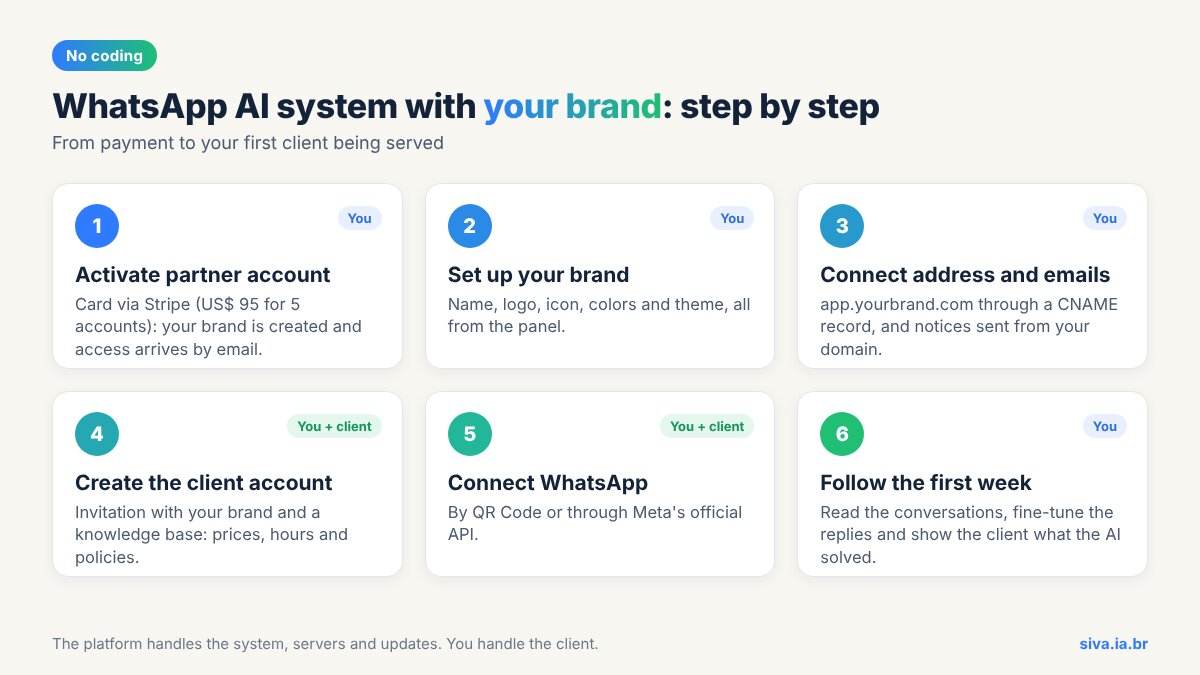
- Activate your partner account. In the SIVA partner program, you pay the starter pack by card through Stripe, your brand is created automatically and the access link arrives by email.
- Set up your brand. Name, logo, icon, colors and theme, all from the panel.
- Connect your address and emails. Create the CNAME record where your domain is managed and connect your email sending account (in SIVA, Resend) so notices go out from your domain.
- Create your first client's account. They get an invitation with your brand. Together, build the knowledge base: products, prices, hours, policies and what should always go to a person.
- Connect the client's WhatsApp. By QR Code or through Meta's official API. If the client already uses the WhatsApp Business app, see how the app and the official API can work together.
- Follow the first week. Read the conversations, fix what the AI got wrong and show the client what it already solved on its own.
What your client gets (and what you're selling)
In SIVA's white label, the product carrying your brand is the full system, the same one businesses use directly. In your client's language, this is what you offer:
- 24/7 AI customer service that answers with the business's own information, understands voice notes, reads photos and documents, and hands off to a person with the full history.
- Ready Reply: the AI suggests the answer and the agent reviews it and sends it with one tap.
- Several agents on the same number, with departments and transfers.
- Sales in the chat: catalog, orders, payment links and appointment booking.
- Follow-up with people who stopped replying, sales pipeline, labels, campaigns and groups.
Each account includes 1,000 AI replies per month. To see the product your clients will use, visit SIVA and see how it compares with Wati.
Who does what: you, your client and the platform
| Who | Takes care of |
|---|---|
| Platform | System, servers, updates, AI and the monthly invoice for the accounts |
| You (partner) | Sales, setup, knowledge base, WhatsApp connection, follow-up and billing your client |
| Your client | Providing the business information, keeping WhatsApp connected and replying when the AI hands off |
In the partner panel, you see all your clients, their AI usage and who has connected WhatsApp, sign in to a client's account to help, and get alerts when something needs attention: WhatsApp disconnected, 7 days without conversations or 80% of the AI quota used, with a daily summary by email. Your team can join you too, with up to 20 admins.
What it costs to start
Example with SIVA: the cost is US$ 19 per client account per month. You start with a pack of 5 accounts, US$ 95, which already covers the first month of those 5. There's no entry fee and no setup fee, and you pay by card through Stripe. After that, the invoice is issued in US dollars on the 1st, is due on the 10th and charges at least 5 accounts (or your active accounts, if there are more). Each extra account is US$ 19 at creation (its first month) and then joins the invoice.
Example (illustrative, before taxes and payment fees): if you charge each of 5 clients US$ 49 a month, the price SIVA is sold at directly, you receive US$ 245 and pay a SIVA invoice of US$ 95 (5 × US$ 19), which leaves you US$ 150 a month.
Not included: your domain, your email sending account and, for clients on the official API, the messages Meta charges for. What you charge each client is your decision, and the difference is yours. To set your price, see how to price white label software and the simulation of how much you can earn.
Tip: This guide is for information only. For decisions about company registration, invoicing, taxes and contracts with your clients, talk to an accountant and, if needed, a lawyer in your country.
Common mistakes when starting out
- Selling before using it. First set up an account for a business you know and watch the AI serving real customers.
- A thin knowledge base. The AI answers with what it was taught; missing prices, hours and policies turn into vague answers.
- Promising what the system doesn't do. Sell what you've tested and say clearly when the conversation goes to a person.
- Disappearing after the sale. Clients who see results in the first week stay; keep an eye on the panel alerts.
- Billing by hand. In Brazil, Mexico, Argentina, Colombia, Chile, Peru and Uruguay, partner billing sends each client's charge through your own Mercado Pago automatically. Elsewhere, record each payment in the panel with "Received elsewhere" so you always know who has paid. See how to charge clients automatically.
Before choosing a platform, go through the white label platform checklist. To find buyers, see how to get your first 5 clients.
With the SIVA partner program, the system comes with your brand from day one
You don't need to code, rent servers or stitch tools together: in the SIVA partner program, the WhatsApp AI system comes ready, with your name, your address and your emails. You set what each client pays, track everything in one panel and pay SIVA a single monthly invoice in US dollars. See also white label for marketing agencies and the other guides.
- Full brand: name, logo, icon, 7 themes, an app.yourbrand.com address and emails from your domain
- US$ 19 per account per month; starter pack of 5 accounts for US$ 95, with no entry or setup fee
- Partner panel with alerts for disconnected WhatsApp, inactive accounts and AI quota
- Card payment through Stripe; panel and emails in English or Spanish
FAQ
Do I need to know how to code to have a WhatsApp AI system with my brand?
No. In a white label, the system is ready; you set your name, logo, colors, address and emails from the panel and create your clients' accounts.
Will my client know which platform is behind it?
In the panel, the address, the emails and the QR Code connection, they see your brand. On the official WhatsApp API, Meta's authorization screen shows the technology provider's app, which in this case is SIVA.
How do I put the system on my own web address?
You create a CNAME record in your domain's DNS settings pointing a subdomain, like app.yourbrand.com, to the platform. You only set it up once.
How much does it cost to start reselling SIVA with my brand?
The starter pack is 5 accounts for US$ 95, which covers their first month. After that, each account is US$ 19 per month, with a minimum of 5 accounts on the invoice, paid by card in US dollars.
Who supports my client when they have questions?
You are your client's contact. From the partner panel, you can sign in to their account to help, resend invitations and follow the alerts.