
White label platform checklist: what to check before you choose (and resell under your brand)

To choose a white label platform, check six blocks before you sign: brand (where your name shows up and where the vendor's still does), product (what your client uses every day), limits and costs (quotas, minimums and what's charged separately), reseller panel, billing your clients and invoice rules (including what happens if you pay late).
Switching platforms later is expensive: every client has to reconnect WhatsApp, rebuild the knowledge base and get used to a new screen. That's why this guide brings the full checklist, the questions to ask the vendor and the warning signs.
The white label platform checklist on one page
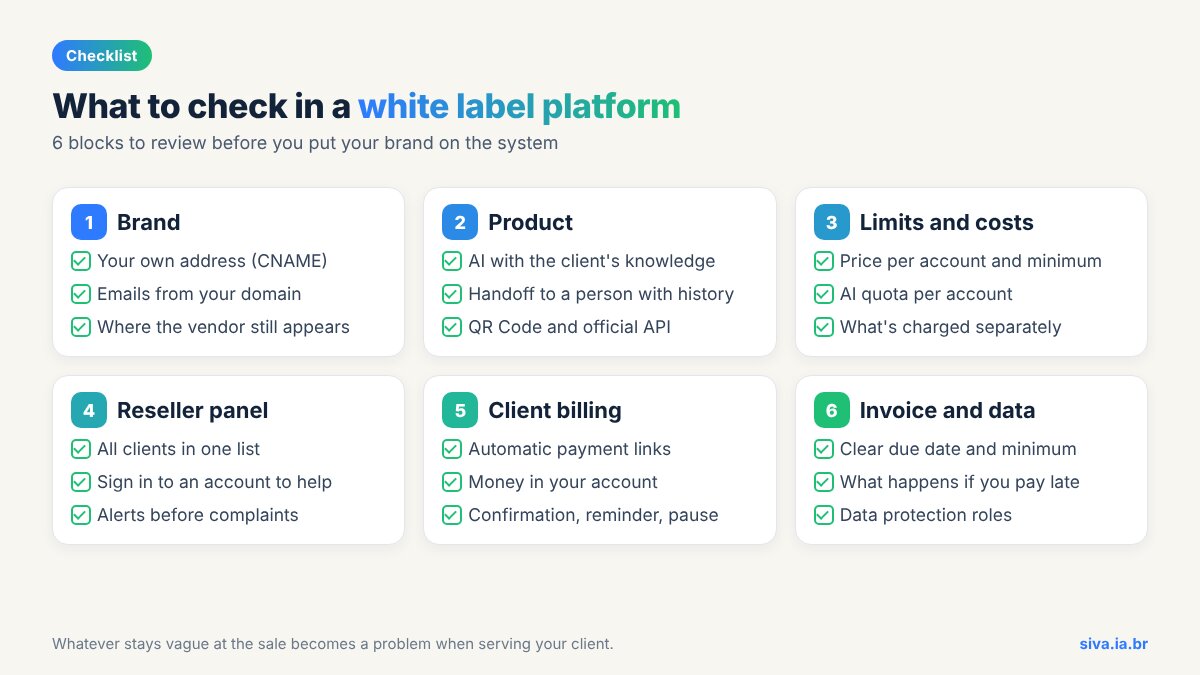
Use the blocks below in a call with the vendor or in a test account. Write down the answer to each item: whatever stays vague at the sale usually becomes a problem when you're serving your client. If you're still deciding between white label, affiliate programs or building your own system, see reseller, affiliate or your own SaaS.
1. Brand: will your client see your name or the vendor's?
- Your own address: can you use a subdomain of yours (app.yourbrand.com), connected through a CNAME record?
- Emails: do invitations and notices go out from your domain?
- Look and feel: can you change the name, logo, icon, colors and theme without asking support?
- Sign-up: is there a sign-up page with your brand to capture clients?
- Where the vendor still appears: ask for the list. Every platform has some point.
Tip: On the official WhatsApp API, the client authorizes access on a Meta screen that shows the technology provider's app. That's how it works with SIVA. With the QR Code connection, everything carries your brand. Ask to see that screen before you decide.
2. Product: what your client will use every day
You'll be selling another company's product under your name. If it fails, you're the one who hears the complaint. Test it in a real account, with the information of a business you know:
- Does the AI answer from the client's knowledge base, understand voice notes and read photos and documents?
- Does it hand the conversation to a person with the history, so the customer doesn't have to repeat everything?
- Can several agents use the same number, with departments?
- Does it have what your clients need to sell: catalog, orders, payment links, appointment booking, campaigns, a sales pipeline?
- Does it connect by QR Code and also through Meta's official API? If a client already uses the Business app, see coexistence between the app and the official API.
Use SIVA as a reference point, and see how it compares with Wati.
3. Limits and costs: what the pricing page doesn't show
| Ask | Why it matters | How it works in SIVA |
|---|---|---|
| How much is each client account? | It's the base of your price and your margin | US$ 19 per account per month |
| Is there an entry or setup fee? | It changes how much you need to sell to cover the start | No; you start with a pack of 5 accounts for US$ 95, which covers their first month |
| Is there a minimum number of accounts? | You pay the minimum even with fewer clients | Minimum of 5 accounts on the invoice (or your active accounts, if there are more) |
| Does the AI have a usage limit per account? | A busy client can run out of quota | 1,000 AI replies per month, with an alert at 80% |
| What is charged separately? | It avoids surprises on your client's bill | On the official API, the messages Meta charges for |
| In which currency, and how do you pay? | It affects your margin and your cash flow | US dollars, by card through Stripe |
SIVA's numbers are detailed in the partner program. With them in hand, setting your price is easy: see how to price white label software.
4. Reseller panel: can you look after 30 clients without a spreadsheet?
With 3 clients, everything fits in your head. With 30, you need the platform to warn you about what's wrong before the client complains. Check that the partner panel has:
- A client list with AI usage and who has connected WhatsApp.
- A way to sign in to a client's account to help.
- Pausing an account and resending an invitation.
- Alerts for disconnected WhatsApp, accounts with no conversations for days and AI quota running low, ideally with an email summary.
- Team access: other people in your company can use the panel.
In SIVA, the "Need attention" alerts cover disconnected WhatsApp, 7 days without conversations and 80% of the AI quota, with a daily email summary, and your team can have up to 20 admins.
5. Billing your clients: where does the money land?
Many platforms solve the brand and forget the money side, and the partner ends up chasing each client on WhatsApp. Ask:
- Can you set the amount and due date for each client?
- Are charges sent automatically, by email and WhatsApp, with a payment link?
- Does the money land in your account or go through the vendor?
- Is there automatic payment confirmation, a late-payment reminder and pausing for clients who don't pay?
- Does it show what was received, what's pending, what's overdue and your profit?
- Does automatic billing work in your country and currency?
In SIVA, if you're in Brazil, Mexico, Argentina, Colombia, Chile, Peru or Uruguay, you connect your own Mercado Pago account: the charge is created 5 days before the due date, in your account's currency, with a payment link sent by email and WhatsApp, automatic confirmation and a reminder. If you choose, the client's account is paused after the number of overdue days you set and comes back on its own when they pay. In other countries, you charge your clients your own way and record each payment in the panel with "Received elsewhere". The step by step is in how to charge clients automatically.
6. Invoice, late payment and data: the rules that matter later
- When is the invoice issued and due? In SIVA, it's issued in US dollars on the 1st, paid by card and due on the 10th.
- Do inactive accounts count on the invoice? In SIVA, paused accounts don't count, while respecting the minimum of 5.
- What happens if you pay late? In SIVA, if the invoice isn't paid by the due date, your clients' accounts are paused the next day and come back automatically when you pay. Knowing this upfront avoids an awkward moment with your client.
- New account mid-month: in SIVA, an extra account costs US$ 19 at creation (its first month) and then joins the invoice.
- Your clients' data: who is responsible for what under data protection law? Under the GDPR, in Spain and the rest of Europe, your client usually acts as the *controller* (decides what to do with their contacts' data) and whoever processes that data on their behalf acts as a *processor*. Local laws in Latin America and India use similar roles, sometimes with other names, so check which law applies in each country where you sell.
Tip: This guide is for information only and doesn't replace an accountant or a lawyer. Before signing with a platform and with your clients, review contracts, company registration, invoicing and data protection responsibilities with a professional in your country.
Warning signs in a white label platform
- Promises of guaranteed earnings. How much you earn depends on how many clients you close and keep.
- Pricing without clear limits. If nobody mentions AI quotas, account minimums and Meta costs, they show up later.
- No way to see the system running. Ask for a demo or set up the first account for a business you know before you sell.
- Half-done branding. The logo is swapped, but the address and emails are still the vendor's.
- Manual-only billing. Every extra client means more work, not more profit.
The SIVA partner program, item by item on the checklist
The SIVA partner program was built to answer this checklist without fine print: your brand in the panel, the address and the emails; the full AI customer service system on WhatsApp; a price per account with a clear minimum; a panel with alerts; and billing for your clients through your own Mercado Pago where it's available, or recorded in the panel everywhere else. You set your price, and the difference is yours. See also what a WhatsApp AI system with your brand includes and the other guides.
- US$ 19 per account per month; start with 5 accounts for US$ 95, with no entry or setup fee
- Full brand with an app.yourbrand.com address, emails from your domain and a sign-up page
- Partner panel with alerts, a daily email summary and a team of up to 20 admins
- Card payment through Stripe; panel and emails in English or Spanish
FAQ
What should I check before choosing a white label platform?
Brand (address, emails and where the vendor still appears), product, limits and costs, reseller panel, billing your clients and the invoice rules, including what happens if you pay late.
Does every white label platform hide the vendor's brand 100%?
Not always. On WhatsApp, the official API has a Meta authorization screen that shows the technology provider's app; with the QR Code connection, everything can carry your brand.
Why does the AI limit per account matter?
Because a busy client can use up the whole quota before the month ends. In SIVA, each account has 1,000 AI replies per month and the panel warns you at 80%.
Who receives my clients' payments?
It depends on the platform. In SIVA, in Brazil, Mexico, Argentina, Colombia, Chile, Peru and Uruguay, charges go through the partner's own Mercado Pago and the money lands in their account. In other countries, the partner charges their own way and records the payments in the panel.
What happens to my clients if I pay the invoice late?
It varies by platform, so ask first. In SIVA, if the invoice isn't paid by the due date, your clients' accounts are paused the next day and come back automatically once it's paid.